


Before you start
- Every source file for each reconciliation in scope this period, exported for the same closing window: bank statements for each operating account, a GL export or trial balance, AR and AP subledger detail, payment processor payout reports, and ad platform spend reports, whichever of these apply to the business.
- A close deadline: the date the books lock, or the date the close package is due to whoever reviews it.
- Last period's exported reconciliation reports, if this isn't the first close being run this way, for carrying forward anything left open.
- An owner assigned to each reconciliation in the checklist, if more than one person is running part of the close.
Step 1: Build This Month's Reconciliation Checklist
Not every business runs every check above. List the ones that apply this period: bank to GL for each account, AR subledger to GL, AP subledger to GL, processor payouts to recorded sales, ad platform spend to the GL or a marketing ledger.
Order them by dependency, not convenience. Bank to GL goes first. The AR and AP subledger checks depend on the GL balances being correct, and those balances aren't trustworthy until the bank-side discrepancies are resolved. Running the subledger check first means any bank-side exception reappears there as a GL discrepancy, and gets chased down a second time without anyone realizing it's the same problem.
Assign an owner to each reconciliation if more than one person is running part of the close, and set a target date for each one that lands before the overall deadline. This planning happens outside Reconcile, in whatever the team already uses to track the close.
Step 2: Review What Carried Forward From Last Period's Close
Pull last period's exported reconciliation reports and find every row marked still open. An item open at last close doesn't resolve itself between periods. Each one needs a decision this period: explained and closed now, or flagged again with the reason it's still unresolved.
Skipping this step means the same unexplained gap shows up again this month, gets treated as new, and gets investigated from scratch by someone who has no idea it was already looked at once.
Step 3: Export Every Source File for the Period, Aligned to the Same Close Date
For each reconciliation on the checklist, pull the file fresh at the source: bank statement from the bank's portal, GL export or trial balance from the accounting system, subledger detail from wherever AR and AP are tracked, payout and spend reports from the relevant platforms.
Check that every pair covers the identical window, not only the first one. A GL export that runs through the last calendar day of the month paired with a bank statement cycle that closes on the 28th will fill the report's Missing categories on both sides for that gap, not because anything is missing, but because the two files don't cover the same days. This has to be checked for every pair in the checklist, since a mismatch that's obvious in the bank check is easy to miss in a subledger export that's labeled by fiscal period instead of calendar date.
Step 4: Run the Bank-to-GL Check First
Start a new reconciliation. Put the bank statement in the Source file slot, the main file to check, and the GL export in the Comparison file slot, then click Start Reconciliation.
On the Map columns step, tick the bank's amount and transaction date in the Select columns to map grid, plus the reference number if both files carry one, confirm them in the Preview selected columns table, and pair each with its GL equivalent under Map columns between files: amount to the GL's net amount, transaction date to posting date, reference to reference. Leave the bank's description and the GL's memo line unticked: they describe the same transaction in different words even when nothing is wrong, and comparing them produces exceptions that aren't real.
On the Confirm match rules and tolerances step, Reconcile suggests the matching column under We suggest matching on:, the reference pair if both files carry one, and shows sample values pairing up in Preview match key values. Confirm it, or pick a different pair under Or choose a different column.
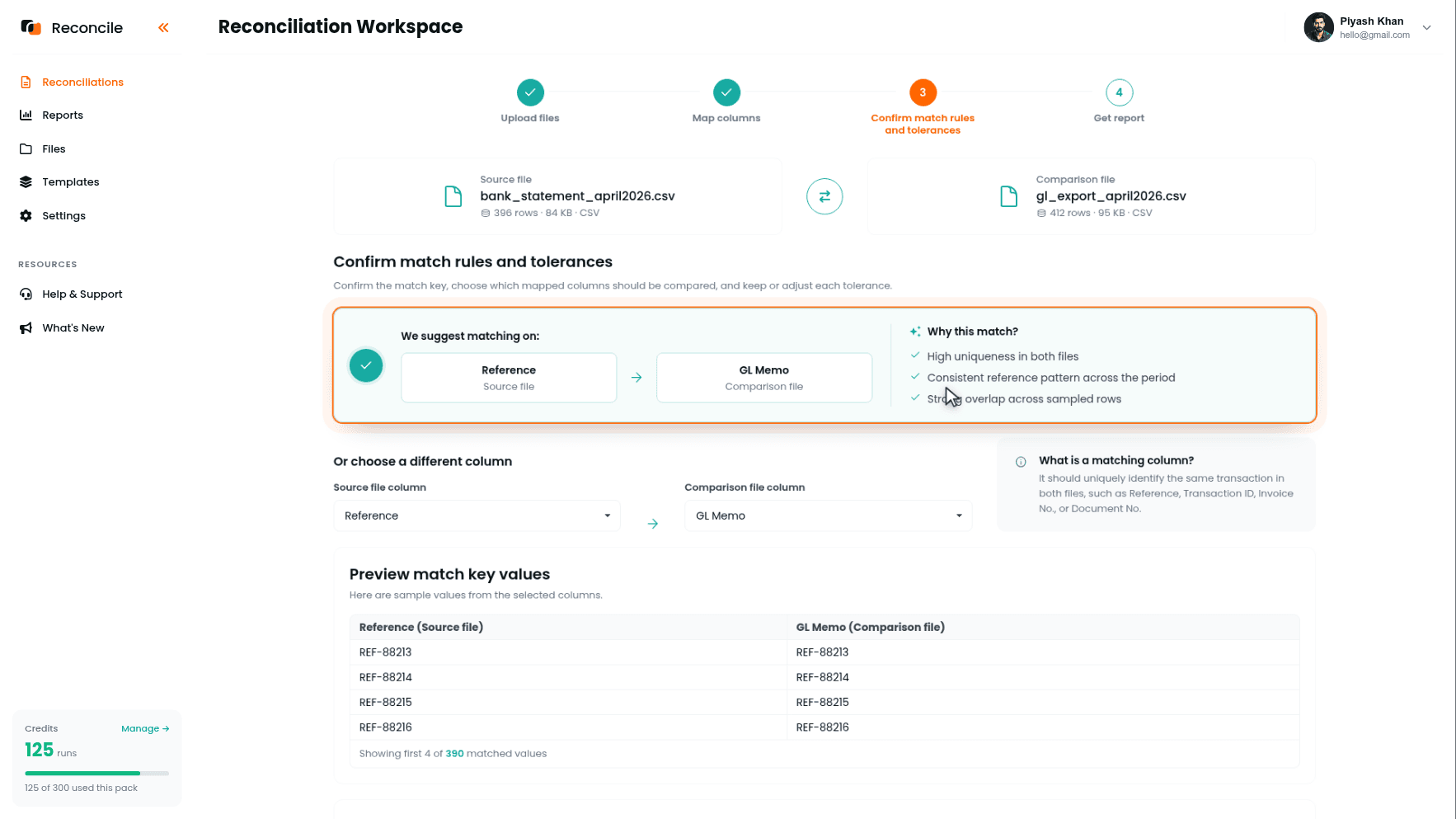
Set the tolerances: amount small, enough to absorb a currency rounding difference and nothing wider, since a bank-to-GL gap should almost always be exact, and date within a few days, enough to cover a transaction that posts to the GL a day or two after it clears the bank. Click Get report.
Step 5: Clear the Bank-to-GL Exceptions Before Moving Downstream
The report sorts everything into Matched rows, Mismatched rows, Duplicates, Missing in source, and Missing in comparison. Matched rows confirm the GL correctly reflects what happened in the bank. The rest map onto specific causes: a bank fee never recorded lands in Missing in comparison, a deposit posted to the GL a day early beyond tolerance lands in Mismatched with both dates highlighted, a transaction entered twice lands in Duplicates.
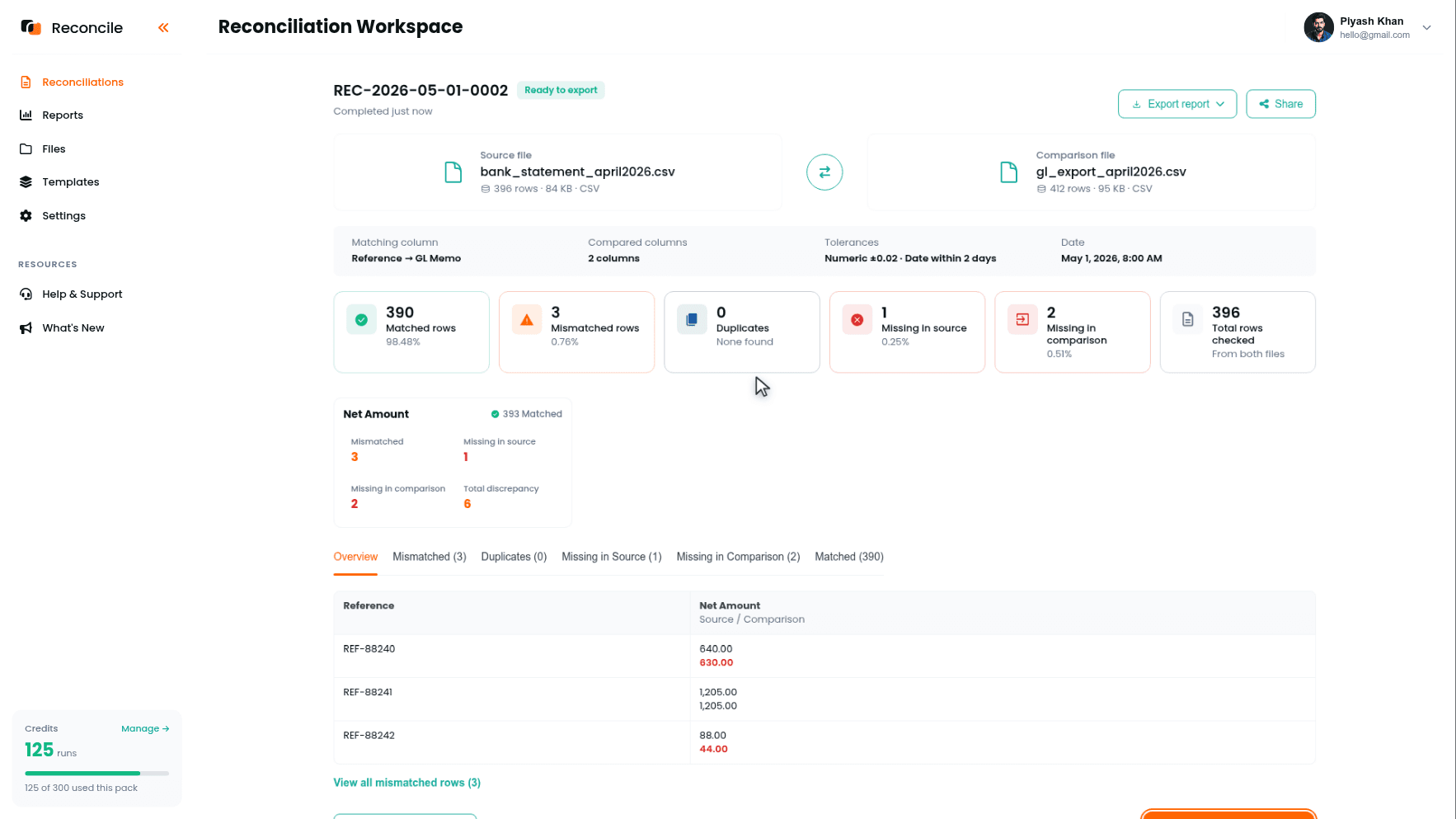
Export the report, which produces a PDF summary and an Excel workbook, and record an explanation against every exception in the workbook, explained, needs correction, or still open, before starting the next reconciliation. Everything downstream in this checklist rolls up into the GL balance this check already confirmed or flagged. Moving on with open items here means whatever's wrong shows up again in the next check, under a different name.
Step 6: Reconcile Each Subledger Against the General Ledger
Run the AR subledger against the GL's revenue and receivable accounts as one reconciliation, and the AP subledger against the GL's payable accounts as another. The four steps are the same ones used for the bank check, applied to a different pair.
The matching column changes here: an invoice number for AR, a vendor bill number for AP, not the bank reference used in the prior check. Date is less useful to compare directly, since a subledger's posting date and the GL's batch posting date can differ by more than a bank transaction ever would; if compared, give it a wider tolerance than the one set for the bank check.
If an AR or AP mismatch here matches the amount of an item left open in Step 5, it's the same problem, not a new one. That's the reason the bank check has to close before this one starts, and the reason to check open bank items first if a subledger exception looks unfamiliar.
Step 7: Reconcile Payment Processor Payouts and Ad Platform Spend Against What Was Recorded
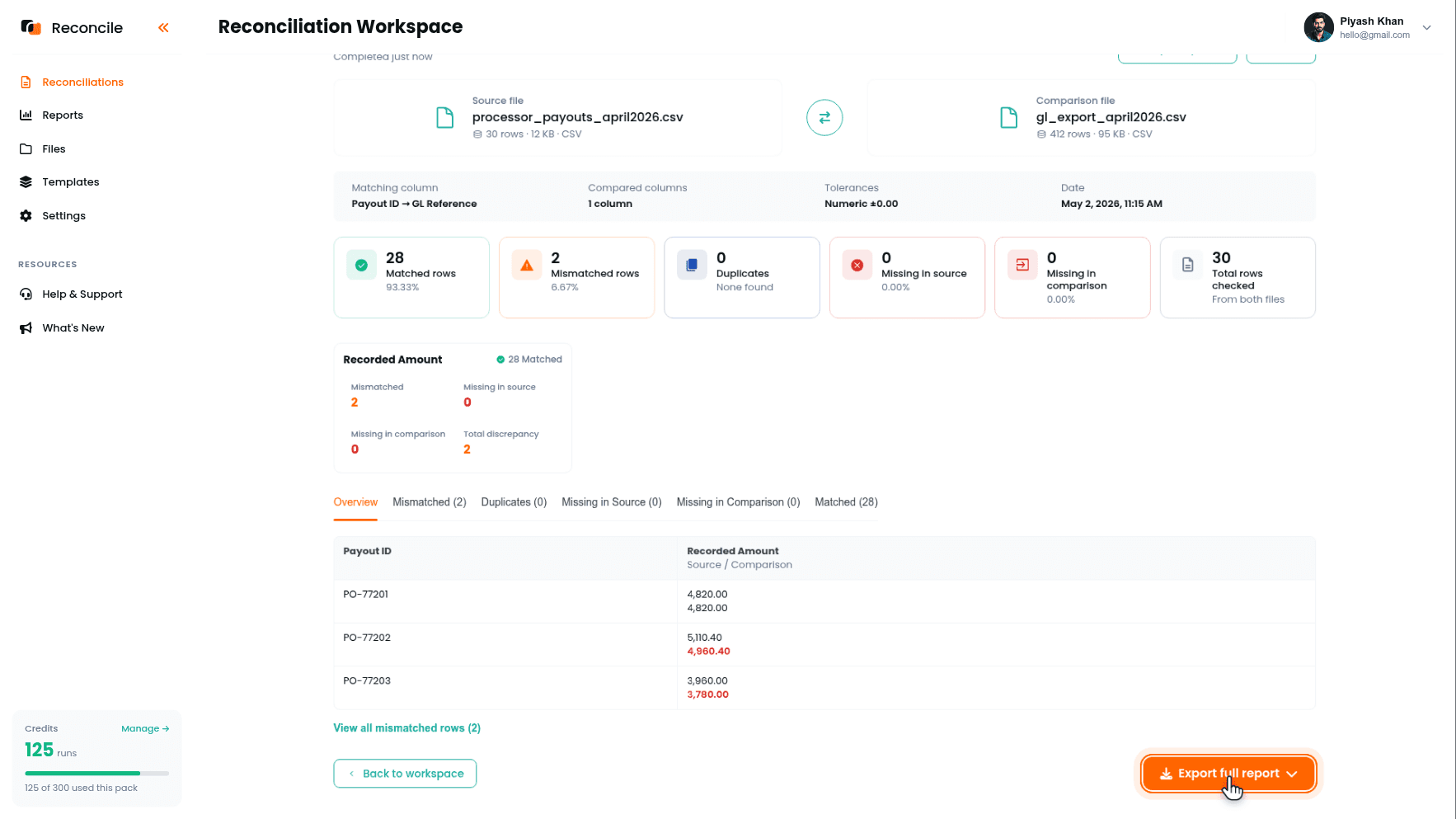
If the business takes card payments or runs ad spend, add these to the checklist: the processor's payout report against the GL or a sales ledger, and the ad platform's spend report or invoice against the GL or a marketing ledger. The matching column is usually a payout ID or an ad platform invoice number.
Map the net amount the processor or platform reports to the recorded amount, not a gross figure computed elsewhere. A payout is already net of fees, and comparing it against gross sales produces a mismatch on every single row, not because anything is wrong, but because the fee was never going to disappear by comparing harder.
Step 8: Consolidate Every Open Exception Against the Close Deadline
With several reconciliations run, possibly by different owners, pull together every row still marked needs correction or still open across all the exported reports before the deadline. For each, decide whether it can be explained and closed now, or has to roll forward as a carryforward item for next period's Step 2.
This is a different decision than explaining a row inside a single reconciliation. That earlier explanation asks whether one specific row is accounted for. This one asks whether the whole checklist is clean enough to close on schedule, and if not, which items are the ones holding it up.
Step 9: Export and Assemble the Close Package
Each report finishes marked Ready to export. Use Export full report on each reconciliation separately: bank to GL, AR subledger to GL, AP subledger to GL, and any processor or ad platform check that was run. Each export produces a PDF summary and an Excel workbook with the row-level detail behind it. Keeping the reconciliations separate, rather than merging them into one file, preserves which stage of the close a remaining exception came from, and the workspace list shows every run's status if a reviewer wants to trace one back.
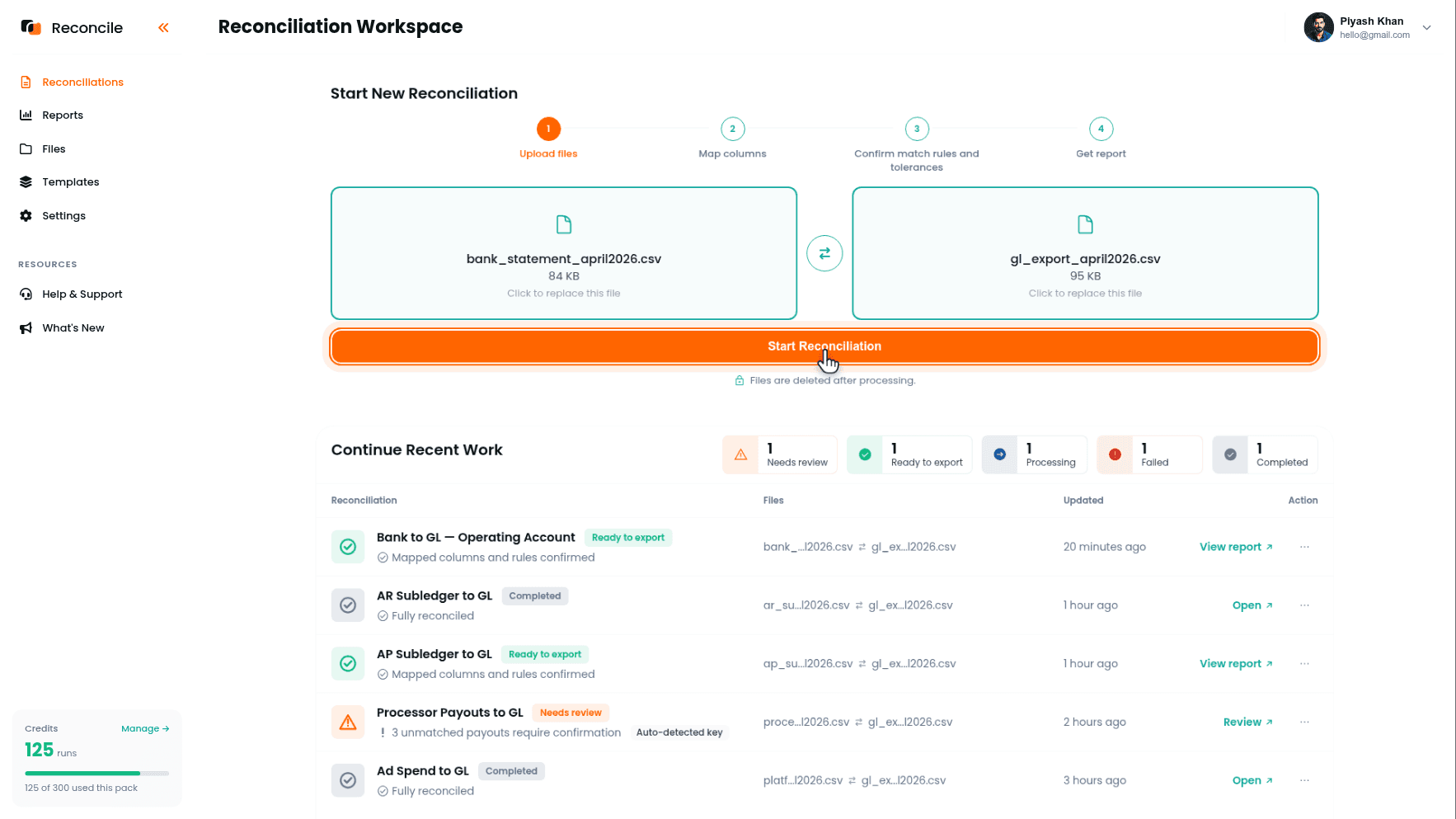
Assemble the PDFs and workbooks into the period's close package, whatever a controller, auditor, or reviewer expects to see: matched counts, mismatches, duplicates, missing rows, and the explanation recorded against each exception. The books still lock in the accounting system. This package is the evidence that what went into that close was checked, not assumed.
Key takeaways
- Month-end close with CSV exports is a checklist of separate reconciliations, not one comparison. Run them in dependency order: bank to GL first, then subledgers, then processor and ad platform checks.
- An exception left open in an earlier check reappears in a later one under a different name, because the later checks roll up into the same GL balance the earlier check already flagged.
- Items marked still open at last close don't resolve on their own. Review last period's exports before starting this period's files, not after.
- Date range alignment has to be checked for every file pair in the checklist, not only the first, since a mismatch that's obvious in a bank statement is easy to miss in a subledger export labeled by fiscal period.
- Map net figures to net figures in processor and ad platform checks. Comparing against a gross number produces mismatches that were never real discrepancies.
- Consolidating open exceptions against the deadline is a separate decision from explaining a single row: it asks whether the whole checklist is clean enough to close, not whether one row is accounted for.
- Export each reconciliation's report separately and assemble them into the close package at the end. Merging them earlier hides which stage of the close a remaining exception belongs to.



